
EHR vs EMR software in 2026: differences, costs, and how to choose
12 min read
Last updated: Oct 01, 2026
Summary
An EMR is a digital chart that stays inside one practice. An EHR is a chart built to travel – to labs, imaging centers, pharmacies, referring providers and, increasingly, your patient's phone.
In 2026, the two look almost identical on screen, yet behave very differently the moment you connect them to anything else. That's where the EHR vs EMR choice stops being an IT formality and starts affecting cost, timelines, and what you can offer patients.
Below we break down where the real differences live, what drives the budget, and how we scope healthcare software development services around a decision that's costly to reverse.
Key takeaways
The practical EHR vs EMR difference shows up in three places: analytics scope, data model, and whether HL7 and FHIR support is native or arrives through paid middleware.
A realistic budget covers five items – subscription, implementation and data migration, integrations priced per connection, staff training, and ongoing support with compliance updates.
Implementation for a mid‑sized clinic runs 6–7 months across discovery, integration and pilot, and departmental rollout with hypercare. Data migration and training are the most often underestimated items.
Integration projects stall on data mapping and legal sign‑off rather than code, which is what EHR integration services should be scoped around.
There is no best platform, only the best fit, judged on eight aspects, including FHIR‑first architecture, data ownership on exit, proven migration from your current system, transparent pricing, and a visible 12‑month roadmap.

Olga Tsygan
Head of Strategic Partnerships at Modsen
EMR vs EHR: the one‑sentence version
The shortest possible definition: an EMR (electronic medical record) is a digital chart that lives inside one clinic, and an EHR (electronic health record) is that same chart designed from the start to be shared with other providers.
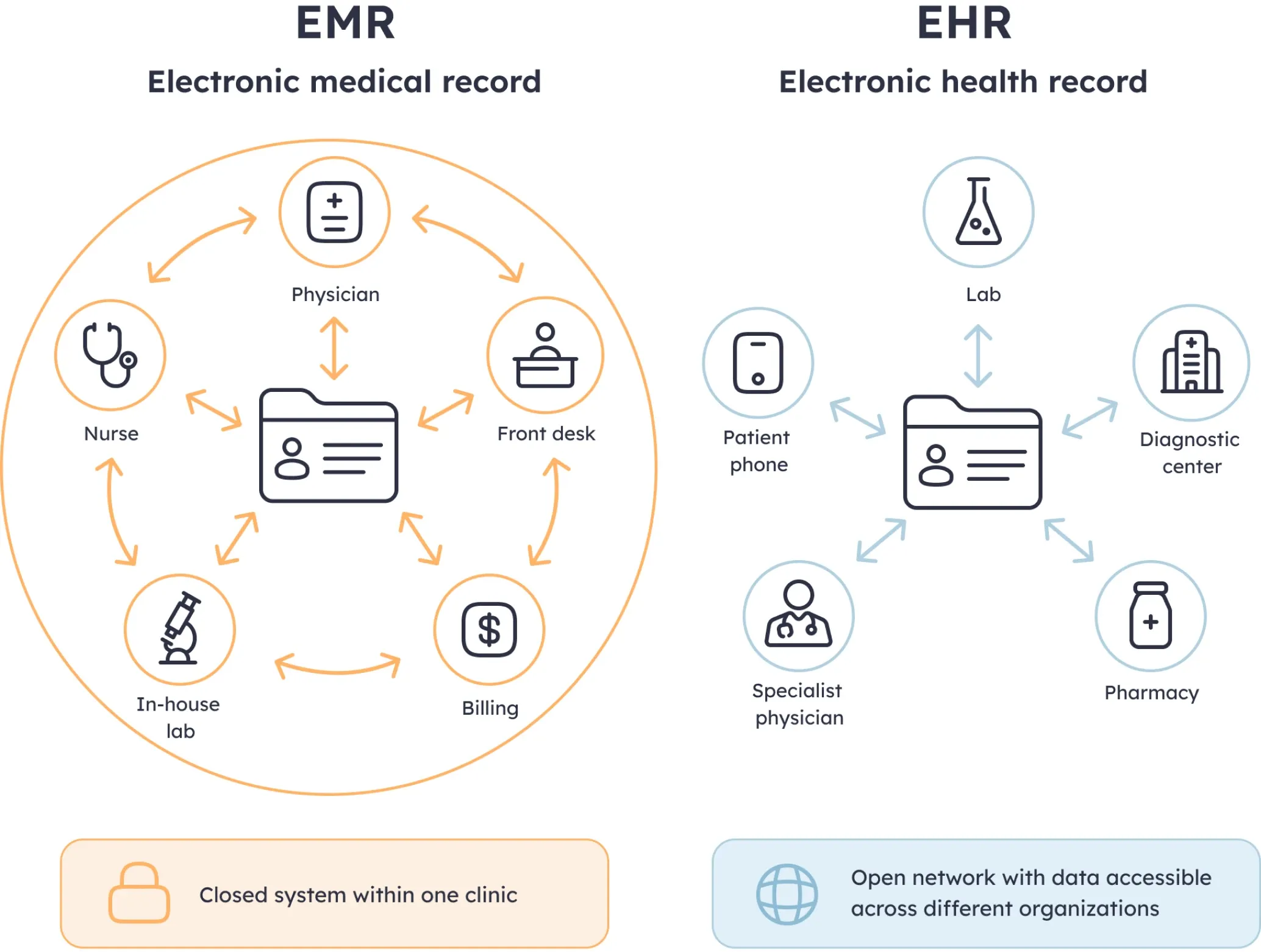
EMR vs EHR: the same patient chart, with a very different number of systems allowed to read it
In practice, the distinction has gone soft. Most modern EMR platforms now support FHIR (Fast Healthcare Interoperability Resources) APIs – the standard that lets one system request a specific slice of a record, like a medication list, instead of sending an entire document for the receiving system to unpack.
Vendors add to the confusion by using both terms interchangeably in sales materials. This means that a product sold as an EMR may already do much of what you need, and a product sold as an EHR may do less than the label suggests.
So, the acronym on the contract tells you very little. Ask three questions instead: what data can leave the system, in what format, and what does it cost you every time it leaves?
That's a conversation for procurement, not for IT. It belongs alongside the other decisions that shape where healthcare digital investment pays off.
What actually differs when you dig into features
An EMR reports on your own practice: visit volumes, no‑show rates, revenue per provider. That's enough to run a clinic day to day.
But it can't answer questions that involve care delivered elsewhere. Ask how many of your diabetic patients had an HbA1c test in the past year, anywhere. The report comes back incomplete, because those lab results were never sent to you in the first place.
An EHR is designed to answer it, and this matters more than it used to. Under modern value‑based contracts, part of your payment depends on patient outcomes, not just on the visits you billed. To claim that payment, you have to document those outcomes – and a patient's outcome includes treatment they received elsewhere.
Yet there’s a catch on the reporting side. Most EMR EHR software lists cross‑facility analytics as a headline feature. In a demo, those dashboards look excellent, because demo data is always complete. Real data isn't. They only work if:
1. Other providers are actually sending you data.
2. The way they label tests and diagnoses has been matched to yours.
Labs and hospitals don't all use the same identifiers, so someone has to map them. That work is rarely part of the contract you signed. It usually lands on you, and the scope depends on two things: how the system organizes a patient record, and how much connectivity it gives you on day one.
Data model: episode‑centric vs patient‑centric
EMR/EHR software structures patient data in one of two ways:
Episode‑centric (typical for EMR): the record is organized around visits. Each appointment creates its own entry with notes, orders, diagnosis, and billing code. A patient's history reads as a stack of separate folders rather than one continuous story. | Patient-centric (typical for EHR): the record is organized around the person. Visits, lab results, prescriptions, and documents from other providers are attached to a single timeline, no matter who created them or where. |
Sounds like a minor distinction, but it isn't. A physician reviewing an episode‑centric chart has to open several visits and reconstruct the sequence manually. In this case, a conflict between two prescriptions from different doctors is easy to miss. A patient‑centric timeline puts both side by side, where the conflict is obvious.
The data model also decides what you can change later. Adding a portal, a mobile app, or an analytics layer on top of a patient‑centric structure is straightforward. Doing it on an episode‑centric one usually means building a translation layer first, and that's a project of its own.
All in all, this is the part of the EHR vs EMR decision that's hardest to reverse: features can be bought later, but the structure underneath your records is set from the start.
Interoperability out of the box
Most EHR platforms handle HL7 (Health Level 7, the older family of messaging standards still used by most hospital systems) and FHIR natively. This is what EHR interoperability means: the connections are built in, tested, and covered by the vendor when something breaks.
With many EMR products, the same capability exists on paper but arrives through middleware – a separate piece of software that sits between your system and everyone else's, translating messages in both directions.
That middleware is where budgets quietly expand. It carries its own license, maintenance, and specialists, becoming a second system to keep alive during every upgrade.
That said, sometimes the right decision is to keep a solid EMR and build a targeted integration layer around it. It's often cheaper than replacing a system your staff already knows. That's a common reason clinics come to us for custom software development services: the platform covers most of what they need, and the gap is where the value sits.
Cost breakdown that vendors rarely show upfront
A typical quote for EMR/EHR solutions usually covers the license and stops there. But the license is rarely where most of the money goes.
Here's the full picture, with ranges common for mid‑sized clinics:
Licenses / subscription
Typical range*
$200–$800 per provider** per month
When it hits
Ongoing
Implementation & data migration
Typical range*
$40k–$400k
When it hits
One-time
Integrations (lab, imaging, pharmacy)
Typical range*
$10k–$60k each
When it hits
One‑time, per connection
Staff training
Typical range*
5–10% of annual budget
When it hits
Launch, then ongoing
Support & compliance updates
Typical range*
15–25% of annual license cost
When it hits
Ongoing
Three lines deserve a closer look.
Integrations are priced per connection, not per project. A clinic that works with two labs, an imaging center, and a pharmacy chain is looking at four separate builds. This is where the EHR vs EMR difference turns into money: platforms with native support often include some of these connections in the license, while systems without it charge for each one separately.
Training is the item most often left out of the business case, and the one that determines whether the rest of the spending returns anything. A platform nobody uses correctly produces incomplete records, and incomplete records break the reporting you bought the system for.
The wide implementation range isn't arbitrary. It depends on the state of your existing data – how many years of records you have, how consistent they are, and how much cleaning they need before they can be moved. A clinic with fifteen years of patient history in an older system will sit near the top of the range. Which is why the current system deserves an audit before the new one is chosen. That's the stage where IT consulting services and solutions pay for themselves.
Not sure which of the two systems you need?
Tell us about your setup and what you're weighing up. We'll come back with a clear answer on what fits your clinic, no strings attached.
EHR implementation: a realistic timeline
Six to seven months is a fair estimate for a mid‑sized clinic. See the breakdown:
Duration
Discovery
6–8 weeks
Integration & pilot
8–12 weeks
Rollout
6–10 weeks
What happens
Discovery
Data mapping, legacy cleanup, payer requirements
Integration & pilot
Lab and imaging connections live, 5–10 physician test in production
Rollout
Department-by-department go-live, then 2–3 weeks of embedded support
Common pitfall
Discovery
Gets cut to hit a deadline, backfires during testing.
Integration & pilot
UX issues found late, when fixing them means retraining everyone.
Rollout
Everything launches at once and week‑one issues pile up.
The timeline is fairly fixed, but the capacity isn't. Most clinics don't have spare integration engineers or QA specialists sitting idle, while hiring them for a six‑month project rarely makes sense. IT team augmentation helps to shorten the calendar – adding two or three engineers to your existing team compresses the integration phase without changing who owns the project.
EMR/EHR integration: Where projects usually stall
Whatever you choose, a typical integration project touches four kinds of systems:
1. Lab (laboratory information system / LIS)
2. Imaging archive (picture archiving and communication system / PACS)
3. Pharmacy systems
4. Regional networks connecting unaffiliated providers (health information exchange / HIE)
The connections themselves are rarely the hard part. What slows projects down is everything that comes with data crossing into another organization:
Data mapping (matching how different systems record the same thing). One system stores a diagnosis under its own internal code, another uses a global standard, a third has a free‑text field a nurse filled in by hand. It can't be automated away, because the decisions need someone who understands both the clinical meaning and the reporting requirements.
Legal sign‑off. Which fields can leave your organization, who owns the data once it arrives, and what your agreements with each partner permit. These questions have answers, but getting them takes weeks with counsel on both sides.
Both bottlenecks are worth planning for early, because they come back on every project that touches patient data. Clinics building their own clinical tools face the same sequence, which is why we treat integration as the first phase of any medical software project instead of a later add‑on.
The same applies to AI. Documentation assistants and risk scoring tools all depend on clean, structured data, and a model that was fed records in three formats gives three answers. The EHR vs EMR decision determines whether that data pipe exists at all, which is usually why integration comes before anything on the current wave of AI adoption in clinical settings.
How to choose without regretting it 18 months later
As we’ve figured out, most EHR EMR software looks similar at first glance. Below are the aspects worth paying attention to before anything is signed.
FHIR‑first architecture. Not “FHIR‑compatible” but built around it. The difference shows up when you need a connection the vendor didn't anticipate.
Open API with documentation you can read before signing. If access requires a partnership agreement, assume every future integration will need the vendor's permission.
Data ownership on exit. In what format, within what timeframe, at what cost. Get this in writing while you're still a prospect.
A completed migration from your current system. Not from a similar one. Specifically yours.
References from clinics your size. A platform that runs a 400‑bed hospital may be unusable for a six‑physician practice, and vice versa.
An SLA with uptime you'd actually accept. 99.9% sounds reassuring, though it permits around 43 minutes of downtime per month. Ask what happens during those minutes and who you call.
Pricing that covers implementation, integrations, and training. If those are quoted separately, ask for the total before comparing vendors.
A 12‑month roadmap you can see. What's shipping, when, and what's been promised for two years running.
Score your shortlist against these eight and the EHR vs EMR question usually answers itself. One platform will already do what you need, or one will need a layer built around it, and you'll know which before you commit.
Whichever way it goes, the real requirements appear after go‑live, which is a good reason to know how healthcare IT support is usually structured ahead of time.
FAQ
Is there any real difference between EHR and EMR in 2026?
Which is cheaper – EMR or EHR software?
How long does EHR implementation take for a mid-size clinic?
What's the biggest hidden cost in EMR/EHR software?
Can we integrate our EMR with lab, imaging and pharmacy systems ourselves?
Conclusion
The EHR vs EMR question turns out to be four questions, and they're connected.
How the system structures a patient record decides what you can build on top of it later. What connectivity comes included decides how much of your budget goes to integrations nobody quoted for. How your existing data looks decides whether implementation lands at the bottom or the top of its range. And how much of that work your team can absorb decides whether six months means six months or more.
None of these are visible in a demo. All of them are answerable before you sign, which is the practical argument for spending a few weeks on discovery rather than discovering the same things during rollout. The clinics that regret this decision rarely picked the wrong platform. They picked a reasonable platform without knowing what it would take to run it.
If you're at that stage now, we're happy to look at your shortlist and tell you what each option will realistically require. Get in touch and Modsen team will walk through it with you.

Get a weekly dose of first-hand tech insights delivered directly to your inbox