
Healthcare IT support: a 2026 buyer's guide for clinics and hospitals
15 min read
Last updated: Nov 02, 2026
Summary
IT support for healthcare in 2026 covers a wide range of work. Sometimes it's simple: a helpdesk resets a password in the EHR system. Sometimes it's much bigger: a managed team runs security monitoring, backups, HIPAA audits, and device protection. Four tiers cover this range. L1 handles helpdesk and devices. L2 handles the network and the EHR system. L3 runs the cloud infrastructure. A security tier handles security monitoring and incident response. The real decision for a healthcare provider isn't whether to get IT support. It's which tiers to keep in-house, which to outsource, and which SLA (service level agreement) numbers matter. Our IT consulting practice at Modsen builds this model, drawing on healthcare software development services.
Key takeaways
IT support for healthcare in 2026 isn't one tier. It splits into four levels: helpdesk, network and EHR administration, cloud infrastructure, and security.
EHR uptime, RPO, RTO, and MTTR are the metrics that actually affect a clinic day to day.
HIPAA-compliant cloud means a specific setup: a signed BAA, encryption at rest and in transit, audit logs, and MFA everywhere.
Three models cover most providers: in-house means control but higher cost, managed services mean predictable pricing but vendor lock-in, and staff augmentation means flexibility with the best overall cost.
Pricing in 2026 typically runs $180–$250+ monthly per seat for managed support, and an in-house team of two to three specialists can cost up to $360,000 a year; the right choice comes down to how stable the workload is from month to month.

Olga Tsygan
Head of Strategic Partnerships at Modsen
IT support for healthcare in 2026: what it actually covers
A modern IT support contract for a clinic or hospital covers six areas.
Helpdesk support. A hospital runs in shifts around the clock, and its IT support for healthcare needs to match that rhythm instead of pausing when the day shift goes home.
Endpoint management. Every laptop, tablet, and workstation needs patching and monitoring, or it becomes the easiest way into the network for an attacker. An unpatched device can turn into a direct path to a HIPAA violation.
Network and Wi-Fi. The front desk, the pharmacy, and the ICU (intensive care unit) all run on the same connection, so one outage touches every department at once. Staff fall back to paper and phone calls, and that slows down exactly the moments where speed matters most.
EHR and EMR support. EHR (electronic health record) and EMR (electronic medical record) are the systems where patient data actually lives, and troubleshooting them requires specialists who understand how these systems connect to labs, pharmacies, and billing. The cost of a slow or unavailable system shows up directly in patient care: a delayed diagnosis or a prescription that has to wait.
Security and HIPAA controls. These controls protect patient data from outside attacks and from ordinary staff mistakes, both of which trigger the same reporting obligations under the terms of the Health Insurance Portability and Accountability Act (HIPAA). A single unprotected system can expose thousands of patient records at once.
Backup and disaster recovery (DR). A backup counts for something only after someone has actually tested a restore from it. DR turns a server failure or ransomware attack into a few hours of downtime instead of a permanent loss of data.
Medical IT support rarely stops at one or two of these areas. A helpdesk without endpoint management leaves devices unpatched. Security controls without backup and DR leave a hospital exposed the moment something goes wrong. The six areas work together as one system, connected by how each piece depends on the others. That's what separates healthcare IT support from generic IT packages built for a retail store or a law office: patient data and clinical uptime raise the stakes on every one of these six pieces.
Many healthcare organizations are now rethinking their entire technology stack at once, a shift we cover in our guide to digital transformation in healthcare 2026.
That system-level view matters more once a provider starts comparing who should run IT support for healthcare: a team inside the organization, or a partner outside it.
Managed services vs in-house team: honest trade-offs
Choosing between an in-house team and a managed IT provider comes down to two things: how much control the organization wants to keep, and how predictable it needs its budget to be. Neither answer is wrong, but each comes with a real trade-off.
Control
In-house team
Full, day-to-day
Managed IT provider
Shared, defined by contract
Budget
In-house team
Variable (hiring, benefits, turnover)
Managed IT provider
Fixed monthly fee
Access to specialists
In-house team
Limited to who's on payroll
Managed IT provider
Broad, across the provider's team
Scaling up or down
In-house team
Slow, tied to hiring
Managed IT provider
Fast, tied to the contract
A small clinic evaluating healthcare IT managed services is usually chasing predictability. A larger hospital system weighing the same decision is often more focused on whether a single managed healthcare IT services provider can actually cover every department at once, from radiology to billing.
Some organizations don't have to choose one extreme or the other. IT team augmentation adds specialists to an existing internal team instead of handing the whole function to a provider, which keeps more control in-house while closing specific skill gaps.
Cost per seat in 2026
According to MSP Companies, healthcare organizations pay $180 to $250 or more per seat per month for managed IT support, since HIPAA documentation, EHR support, and breach-response readiness rule out the cheaper entry-level tiers available to other industries.
An in-house team for a mid-sized clinic typically means two to three IT staff. A single fully loaded IT specialist costs $85,000 to $120,000 a year once salary, benefits, and turnover are factored in, so two to three specialists can run up to $360,000 a year before adding monitoring tools, licenses, and training. That number doesn't include the gap left when someone quits or takes leave.
A managed provider charges per seat instead, which changes the shape of the cost. Healthcare IT support services built this way come with a clear line item every month rather than a payroll that fluctuates with hiring and turnover.
Response times and coverage windows
A managed contract is only as good as the response times written into it, and those times only mean something once the contract also says when they apply. Most providers structure their response commitments into four priority levels:
P1 Critical. The provider responds within 15 minutes. This level covers a down EHR system, a security breach, or anything that stops patient care from moving forward.
P2 High. Every laptop, tablet, and workstation needs patching and monitoring, or it becomes the easiest way into the network for an attacker. An unpatched device can turn into a direct path to a HIPAA violation.
Network and Wi-Fi. The front desk, the pharmacy, and the ICU (intensive care unit) all run on the same connection, so one outage touches every department at once. Staff fall back to paper and phone calls, and that slows down exactly the moments where speed matters most.
P4 Low. The provider responds by the next business day. General questions and minor requests, like a software how-to, land here.
These response times only apply during whatever coverage window the contract defines, and that window is easy to miss when comparing quotes. A clinic that reviews only the response times, without checking the hours those times apply to, can end up with a genuine 15–minute P1 response during business hours and no coverage at all overnight. A hospital doesn't stop needing that P1 response at 6 p.m., which is why the coverage window matters as much as the response time itself when comparing contracts.
HIPAA-compliant cloud hosting: what to check before signing
Picking a cloud provider like AWS, Azure, or Google Cloud is only the first step. None of them offer HIPAA-compliant cloud hosting by default, no matter how large or well-known they are. HHS guidance defines any cloud provider handling PHI (protected health information) as a business associate, a legal status that comes with its own HIPAA obligations, even when the provider only stores encrypted data it can't read. Compliance comes down to how the account is configured and who is legally responsible for the data inside it. Getting that configuration right is easier with a partner who has done it before, which is where IT consulting services and solutions usually come in.
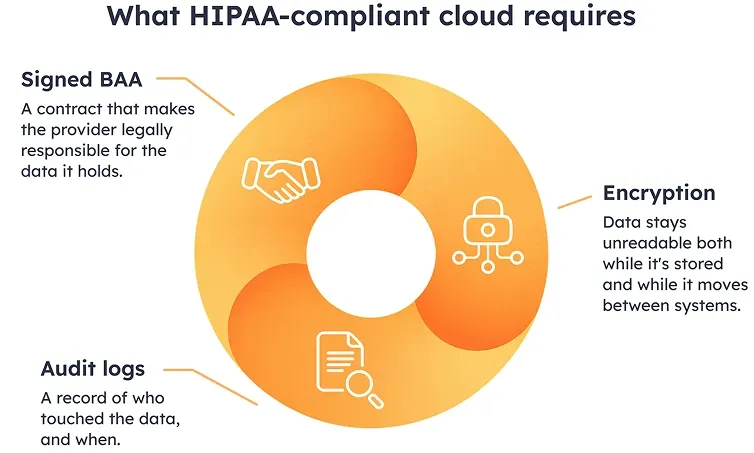
Each of these three pieces closes a different gap. A signed agreement without encryption still leaves data readable to anyone who intercepts it. Encryption without a record of who accessed what makes it nearly impossible to prove what happened during a breach. A cloud account missing even one of these three pieces is exposed, and the fine for that exposure lands on the clinic as often as it lands on the provider. HIPAA compliance testing checks all three of these pieces directly, on a provider's live system.
Data residency and BAA
Two questions come before anything technical: where does the data physically sit, and who is contractually responsible for it?
Data residency refers to the physical location of the servers storing PHI, which matters because different states and countries carry different rules about where medical data is allowed to live. A Business Associate Agreement (BAA) is the contract that makes a cloud provider legally accountable for protecting that data under HIPAA, and no clinic should sign with a cloud vendor that won't provide one.
Encryption sits underneath both of these. Data at rest gets encrypted on AES–256, the standard most cloud providers already support. Data in transit should run on TLS 1.3, which protects information while it moves between a clinic's systems and the cloud. Access controls add a third layer: RBAC (role-based access control) limits who can see what based on their job, and MFA (multi-factor authentication) requires a second proof of identity beyond a password.
Getting the storage and access layer right is only half the picture. The other half is what happens when something fails anyway.
Backup, restore and disaster recovery
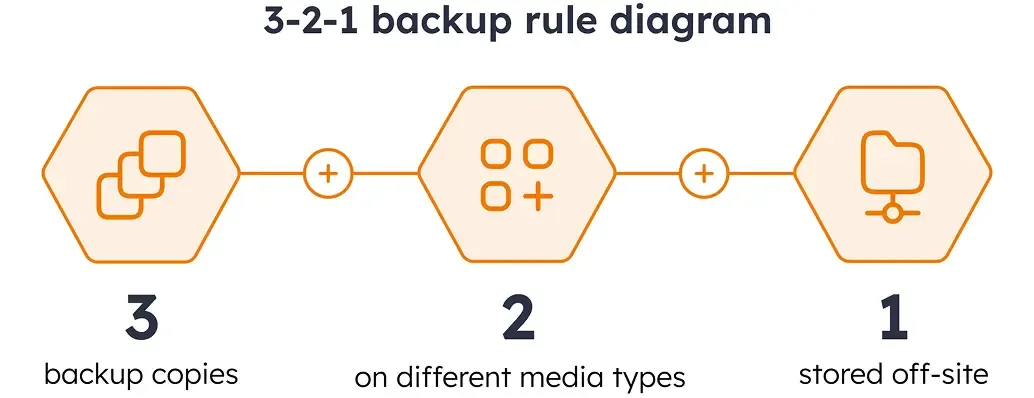
The 3–2–1 rule is not specific to healthcare. CISA recommends it as a baseline for any organization protecting its data: 3 copies of the data, kept on 2 different types of storage media (like a hard drive and the cloud), with 1 copy stored off-site, away from your business location. This spreads the risk so that a single failure, whether it's a server crash, a ransomware attack, or a fire in the building, can't take out every copy at once.
This rule covers how many copies exist and where they're stored, but it doesn't say how fast a clinic gets back online after something breaks. That's what two more numbers are for.
RPO (recovery point objective) sets how much data a clinic can afford to lose, typically 15 to 60 minutes for most healthcare systems. RTO (recovery time objective) sets how long the clinic can run without the system before the delay itself becomes a problem, usually 1 to 4 hours for clinical systems. Both numbers should be written into the contract, not left as an assumption, since a backup that has never been tested for restore is closer to a guess than a plan.
For a closer look at how this fits the systems clinics rely on daily, our guide to EHR vs EMR software in 2026 covers where backup and recovery intersect with the records themselves.
Not sure which tier of IT support your clinic actually needs?
Share where your organization stands today, and we'll help you sort through the options: what to keep in-house, what to hand off, and what the numbers actually look like once you compare them side by side.
Healthcare inventory management: the operational half of IT support
Most IT support conversations focus on networks, endpoints, and software. Healthcare inventory management rarely comes up first, even though according to a study published in Health Care Management Science, inaccurate inventory tracking tied to patient billing is a common problem in hospitals. A missed scan is a staff error, but catching it, flagging the mismatch, and syncing the correction back to billing is a systems problem, and that's the piece a managed IT provider is equipped to run.
The fix that actually closes this gap is connecting inventory to the EHR. That link is what makes modern healthcare inventory management systems different from a simple stock spreadsheet. When a clinician schedules a procedure, the system checks what that procedure needs and reserves the matching supplies automatically, without anyone manually updating a count.
Real-time stock levels
What it does
Shows what's on hand right now, not what was on hand at last count
Automatic supplier orders
What it does
Triggers a reorder once stock crosses a set threshold
Expiration tracking
What it does
Flags medications and supplies before they expire
Billing integration
What it does
Matches what was used to what gets billed
Getting this right shows up directly on the balance sheet. Clinics running real-time inventory tracking typically see expired-stock write-offs drop by 15 to 30%, since supplies get flagged and used before they expire instead of sitting until it's too late.
For clinics building or replacing this layer entirely, that work usually falls under custom software development services, since hospital inventory software built around one clinic's actual supply chain looks different from an off-the-shelf package built for a generic hospital. That build process is covered end to end in our piece on medical software development.
Security and HIPAA compliance testing: the yearly rhythm
Design and features answer whether a system works. Testing answers whether it stays working, and stays compliant, all year. HIPAA-compliance testing isn't a one-time checkbox. It runs on a yearly rhythm: a risk analysis at the start of the year, technical testing spread across the months that follow, and continuous monitoring in between. Breaking it into monthly, quarterly, and annual tasks keeps the work predictable.
Most clinics don't have the in-house expertise to build that yearly calendar on their own, which is where IT consulting services and solutions usually come in, helping a clinic figure out what needs testing, how often, and by whom.
Vulnerability scans and penetration testing
A vulnerability scan works like a checklist run by software: it goes through a network looking for known weak spots, like outdated software or an open port that shouldn't be open, and reports what it finds. A penetration test goes a step further. A security specialist takes that same list of weak spots and actually tries to use one to get into the system, the same way a real attacker would. The scan tells a clinic where the doors are unlocked. The test tells them whether someone could actually walk through one.
In December 2024, HHS proposed a rule that would require vulnerability scans at least every 6 months, and a penetration test at least once a year. That gives clinics a concrete benchmark to plan around, even before any final rule takes effect. A re-test after any major change, like switching to a new HIPAA compliant cloud hosting provider, is standard practice on top of that regular schedule.
Tabletop exercises and incident response
A tabletop exercise is a walkthrough of a security incident, like a ransomware attack or a data breach, done as a group discussion rather than a live simulation. The team talks through exactly what would happen: who calls who, who has the authority to shut down a system, who notifies HHS and within what deadline.
This is where a written incident response plan gets tested for real. A plan that only exists on paper tends to fall apart the first time two people think they're each in charge of the same decision. Running this once a year is common practice, and many managed healthcare IT services contracts already build it into the scope, since the same team monitoring security day to day is usually the one that would respond to a real incident.
Security testing on this scale connects to a broader shift already happening in how healthcare handles risk. Our piece on AI in healthcare news 2026 covers where AI is starting to change incident detection itself.
How to pick a healthcare IT support vendor without regret
A feature list looks the same across most vendors. What actually differs is how each one operates once a clinic signs, and that's what the questions below are built to surface. Getting this right matters just as much whether a clinic is comparing IT support for healthcare providers for the first time or switching from an existing one.
Do you have references from other clinics or hospitals?
Why it matters
General IT experience doesn't cover HIPAA, EHR systems, or clinical workflows. A reference from another healthcare provider confirms the vendor has actually done this before.
Are your SLA numbers written into the contract itself?
Why it matters
A sales deck can promise anything. Only the signed contract is enforceable if response times slip.
Can you provide your standard BAA template?
Why it matters
A vendor that hesitates or can't produce one isn't ready to handle PHI, regardless of what else they offer.
How many senior engineers will be dedicated to our account?
Why it matters
A proposal built around a large team on paper can still mean one junior technician handling actual tickets.
What's the escalation process when the first responder can't solve it?
Why it matters
This shows whether a problem gets handed off with context or gets stuck waiting for someone to notice it.
Who owns our compliance documentation?
Why it matters
If the answer is unclear now, it becomes a real problem when an auditor asks for records and nobody has them ready.
Some warning signs show up separately from how a vendor answers the questions above. A few of them are worth watching for on their own, especially for a clinic considering medical IT support for the first time:
"Unlimited support" with no defined scope. Unlimited usually means undefined, and undefined means disputes later over what's actually included.
No security engineer on the team. A team that only handles helpdesk tickets isn't equipped to run vulnerability scans or respond to a breach.
No tiered response system. If every ticket gets treated the same way, a down EHR system waits in the same queue as a password reset.
No written incident response plan. A vendor that hasn't put this on paper hasn't tested it either.
These questions take one conversation to ask. They save a much longer process later, after the contract is already signed. Some clinics find that no single vendor of healthcare IT managed services covers everything on this list, and that's usually when healthcare software development services become the more direct option.
FAQ
What does IT support for healthcare usually include?
How much do healthcare IT managed services cost in 2026?
Do we need HIPAA-compliant cloud hosting or a private data center?
How often should HIPAA compliance testing happen?
Can IT support for healthcare cover inventory management too?
Conclusion
IT support for healthcare in 2026 isn't one decision. It's several: which tier to keep in-house, how HIPAA-compliant cloud hosting actually gets configured, how often compliance testing runs, and which vendor can back up its promises with a written SLA.
These pieces work together. A gap in one usually costs more to fix later than it would have cost to get right from the start. If these are questions your clinic or hospital is already asking, contact us and we'll help you work through them.
References
1.
2.
3.
4.
5.
6.

Get a weekly dose of first-hand tech insights delivered directly to your inbox