Logistics management software in 2026: a complete buyer's guide
11 min read
Last updated: Jul 26, 2026
Summary
Companies still running freight on spreadsheets and phone calls leave money on the table every quarter – industry estimates put preventable losses at 15–25% of logistics spend, and McKinsey reports that AI-enabled distribution operations cut logistics costs by 5–20%. The global market for these tools reached $13.46 billion in 2025 and is on track for $19.85 billion by 2029. That is why logistics management software has become a priority for operations teams.
This guide covers the main types of software, the features that matter, how to evaluate vendors, and when custom logistics software development services beat off-the-shelf tools.
Key takeaways
Logistics management software automates planning, execution, and tracking of goods movement, replacing spreadsheets and manual coordination with one system.
Types: TMS, WMS, OMS, YMS, fleet and route, freight brokerage, and visibility platforms with ERP as the umbrella over them.
Features that matter: real-time tracking, route optimization, carrier management, inventory visibility, automated alerts, analytics, and API integrations.
AI is the 2026 baseline: predictive ETAs, demand forecasting, anomaly detection, and dynamic routing.

Paul Kirikov
Head of Business Development Department at Modsen
What is logistics management software? Definition


Logistics management software is a category of tools that automates the planning, execution, and monitoring of goods movement from the warehouse shelf to the customer's door.
It replaces manual coordination across transport, storage, and order handling with a single system that records what is happening and flags what is about to go wrong.
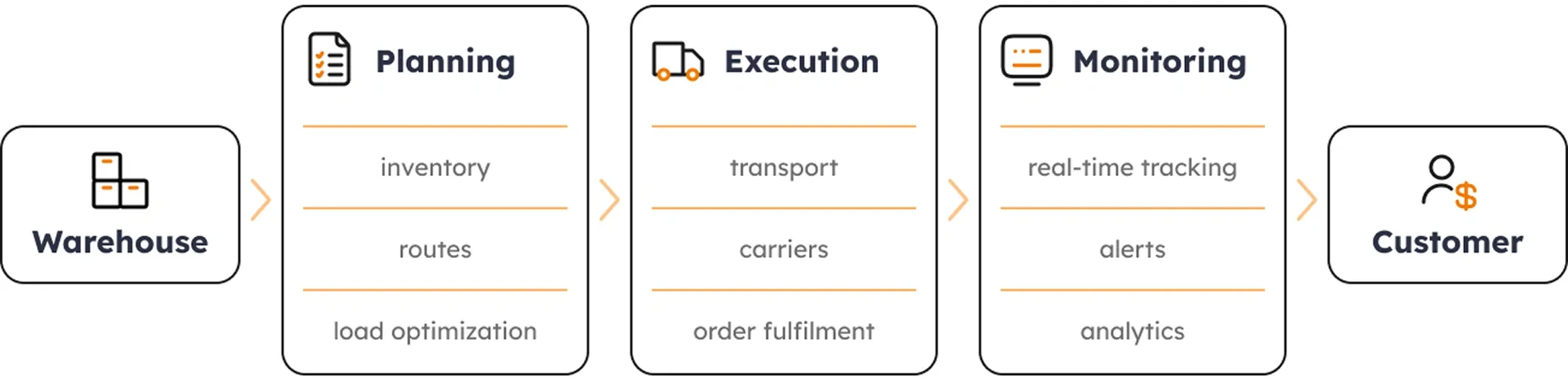
What part of the operation costs you the most when it breaks? A company bleeding margin on transport needs a different tool than one losing stock in a warehouse. The right logistic software maps to the specific failure point, not to a feature list. That is why Modsen team starts every logistics engagement with a process audit before recommending a system type.
Types of logistics software: TMS, WMS, OMS, YMS, freight platforms
Each logistics management software fits a different operation, price point, and buyer. The Modsen team builds across all of these categories from standalone TMS and WMS to full custom platforms as part of our custom software development services. Below are the main types with what each one does and who it is built for.
1. Transportation management system (TMS)

Governs goods in motion between locations. Compares carrier rates, assigns loads, tracks freight from pickup to delivery, and audits invoices against what was quoted. Without it, transport spend is hard to see and harder to control.
Best for: companies moving $10M+ in freight a year
2. Warehouse management system (WMS)

Governs everything inside the facility. Tells workers where to put incoming stock, where to find it when an order arrives, and how to pack and dispatch it. Eliminates paper pick lists and gives managers a live inventory view.
Best for: 10,000+ Stock Keeping Unit (SKUs) or multi-site warehousing
Modsen case: an AI-powered virtual assistant for a logistics and distribution company: NLP inventory search, real-time order status, warehouse navigation, ML demand forecasting. Result: 60% productivity boost, 35% reduction in inventory holding costs.
3. Order management system (OMS)

Sits between sales channels and fulfilment. Captures orders from every source, allocates them to the right warehouse or carrier, and keeps customers and ops teams updated on status. Essential for any multi-channel operation.
Best for: omnichannel retail and e-commerce operations
Modsen case: a delivery management platform for a Central European company – order placement, courier job claiming, real-time monitoring, geolocation, e-signature. Result: 27% faster delivery, 32% more orders processed.
4. Yard management system (YMS)

Coordinates trailers, docks, and yard moves. In high-volume facilities, unmanaged yards create bottlenecks that ripple through the entire operation. A YMS gives supervisors live yard visibility and automates dock scheduling.
Best for: high-volume distribution centres
5. Fleet and route management

Runs your own delivery vehicles and plans their routes from driver assignments to daily delivery schedules.
Best for: companies operating their own fleet or last-mile network
Modsen case: a Kotlin Android fleet management app for a German freight company – GPS tracking, intelligent dispatching, predictive maintenance, ERP and WMS integration. Result: 25% faster deliveries, 30% lower fuel costs, 40% fewer maintenance expenses.
6. Freight brokerage platform

Matches shippers with available carriers on demand. Replaces phone calls and emails with a digital marketplace for comparing rates, booking capacity, and managing load documents in one place.
Best for: variable freight needs or 3PL sourcing
7. Supply chain visibility platform

Aggregates tracking data from all carriers into one live view. Predicts ETAs based on real conditions and alerts operations teams when a shipment is at risk before the customer notices.
Best for: global shippers coordinating many carriers
Modsen case: a custom IoT temperature monitoring system for a food logistics company transporting perishable goods – continuous temperature control, automated adjustments, real-time deviation alerts. Result: 100% goods preservation rate, 34% annual revenue growth.
For a walkthrough of where these fit across transport scenarios, see this transportation logistics software – use cases guide.
TMS vs WMS vs ERP: How they differ and when you need each
These three get mixed up more than any others, so before the full catalog of types below, it is worth telling them apart. Buying the wrong layer is an expensive mistake. Here is what each one means in plain terms.
TMS (Transportation Management System) handles goods in motion between locations – routes, carriers, and freight costs.
WMS (Warehouse Management System) handles goods at rest inside a facility – inventory, putaway, picking, and packing.
ERP (Enterprise Resource Planning) is the broad business platform that ties finance, HR, procurement, and also logistics into one system.
ERP is the umbrella; TMS and WMS (as the most popular types) either run standalone or sit inside an ERP as modules.
TMS
Primary function
Route planning, carrier management, freight costs
Where it operates
Between locations (origin → destination)
Best for
Companies with complex transport networks
WMS
Primary function
Warehouse operations, inventory, picking/packing
Where it operates
Inside the warehouse
Best for
Companies with large warehouse operations
ERP
Primary function
Full business integration (finance, HR, logistics, procurement)
Where it operates
Across the entire business
Best for
Companies that need one system across all departments
The right software for logistics depends on which view of the operation you are missing.
When to choose off-the-shelf vs custom logistics software
The decision comes down to fit, time, and ownership. Off-the-shelf gets you running in weeks; custom logistics management software gets you a system shaped to your operation. Both are correct in the right situation.
Off-the-shelf
Time to deploy
1–3 months
Long-term TCO
Higher (licensing)
Workflow fit
Standard processes
Integration complexity
Limited
IP ownership
Vendor
Custom
Time to deploy
6–18 months
Long-term TCO
Lower (no recurring fees)
Workflow fit
Unique or complex processes
Integration complexity
Unlimited
IP ownership
You
As a rough rule, custom is worth building in three cases: the business is a 3PL, it has to connect many carriers in complex ways, or its compliance rules go beyond what standard platforms support. For how a build is scoped and timed in practice, see this 3PL software development – scope and timeline.
You do not need to build all of this in-house.
Modsen team adds AI-driven prediction and real-time tracking to existing logistics platforms.
Core features of logistics platforms in 2026
A logistics management software feature only matters if it changes business stats (cost per shipment, on-time rate, or hours of manual work). The Modsen team builds and integrates all of these as custom modules or standalone service fitted to your existing stack. Here is what to look for and what each capability actually produces:
1. Real-time shipment tracking. GPS and IoT sensors mean operations teams and customers always know where cargo is, which cuts "where is my order" calls and the firefighting around them.
2. Route optimization. Sequences stops to cut distance and idle time; industry estimates put fuel savings at 10–25%, commonly cited as up to roughly 20%.
3. Carrier management. Compares rates, manages contracts, and tracks carrier performance so you stop overpaying the carriers that miss deadlines.
4. Inventory visibility. Shows real stock levels across locations, which prevents both stockouts and the dead capital tied up in overstock.
5. Automated alerts. Flags a delay before it cascades, turning a 2 a.m. crisis into a same-day reroute.
6. Reporting and analytics. Operational dashboards for cost per shipment and on-time rate, so decisions rest on data.
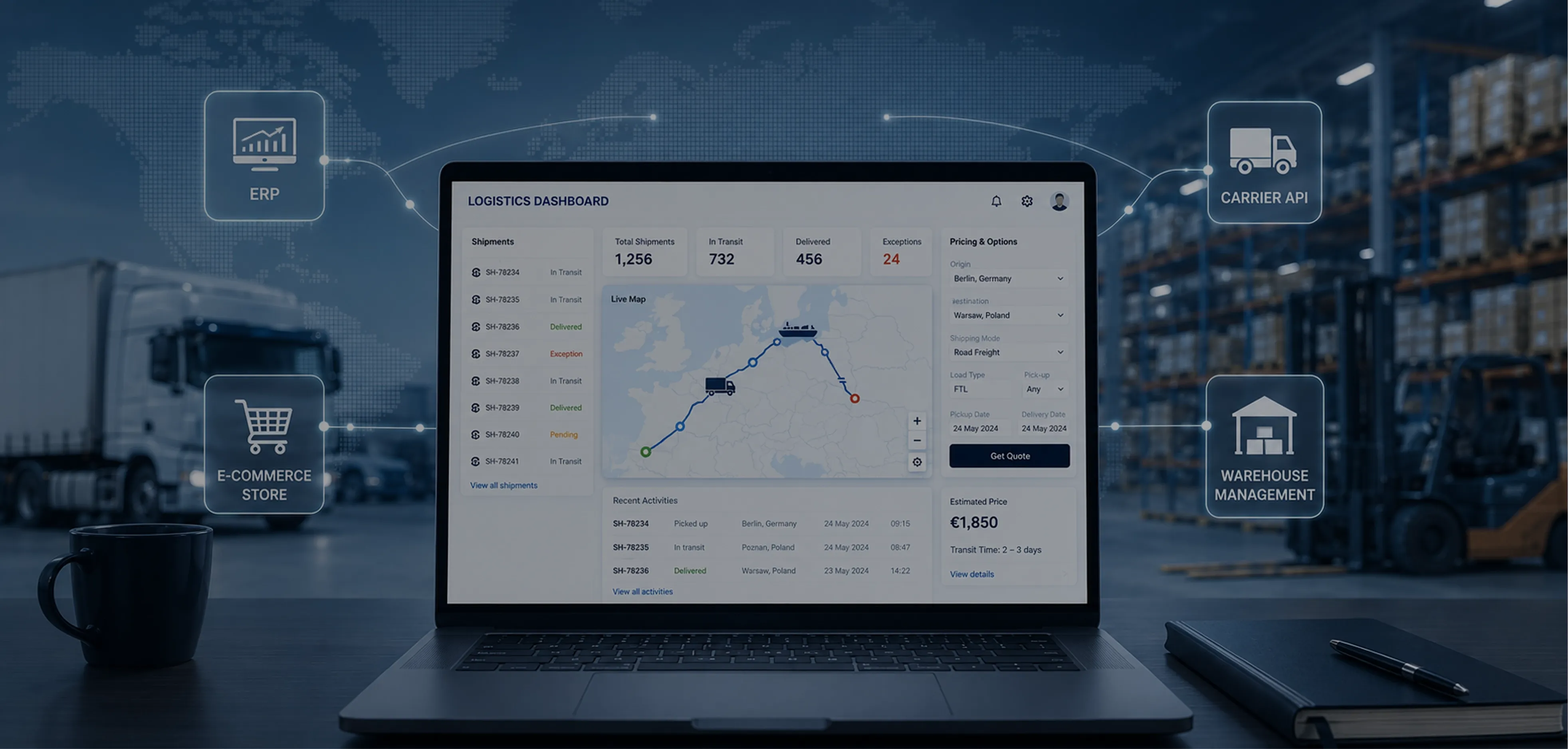
7. API integrations. Connect the platform to your ERP, e-commerce store, and carrier systems so data stops living in disconnected silos.
Strong logistics software solutions treat these as one connected system. A delay alert is only useful if it triggers a reroute the dispatcher can act on inside the same screen. When evaluating shipping and logistics software, analyse how features work together under a real scenario rather than ticking each box in isolation.
AI and real-time tracking: the new standard in 2026
Real-time tracking has moved from a premium add-on to a baseline expectation. GPS feeds and IoT sensors stream location and condition data into visibility platforms, giving a live picture of cargo in transit. The shift in 2026 is that AI logistics management software now acts on that data instead of just displaying it.
Four AI applications carry the most weight:
Predictive ETAs (Estimated Time of Arrival) estimate delivery time from live traffic, weather, and a carrier's historical performance. | Demand forecasting anticipates volume swings to prevent both overstock and stockouts. |
Anomaly detection flags deviations from the plan before they become missed deliveries. | Dynamic routing adjusts routes in real time as conditions change on the road. |
The business case is documented. McKinsey found that AI-enabled distribution operations achieve 5–20% logistics cost reductions and 20–30% lower inventory, with AI-powered tools adding 7–15% additional warehouse capacity. For a deeper breakdown of where those savings come from, see how AI cuts logistics costs guide.
Logistics software for different business sizes: SMB to enterprise
Company size has a huge impact on what logistics management software makes sense. A platform that works perfectly for a regional carrier with 20 trucks may be too limited for a global enterprise. At the same time, enterprise-grade software can overwhelm a small business with unnecessary features, complexity, and costs.
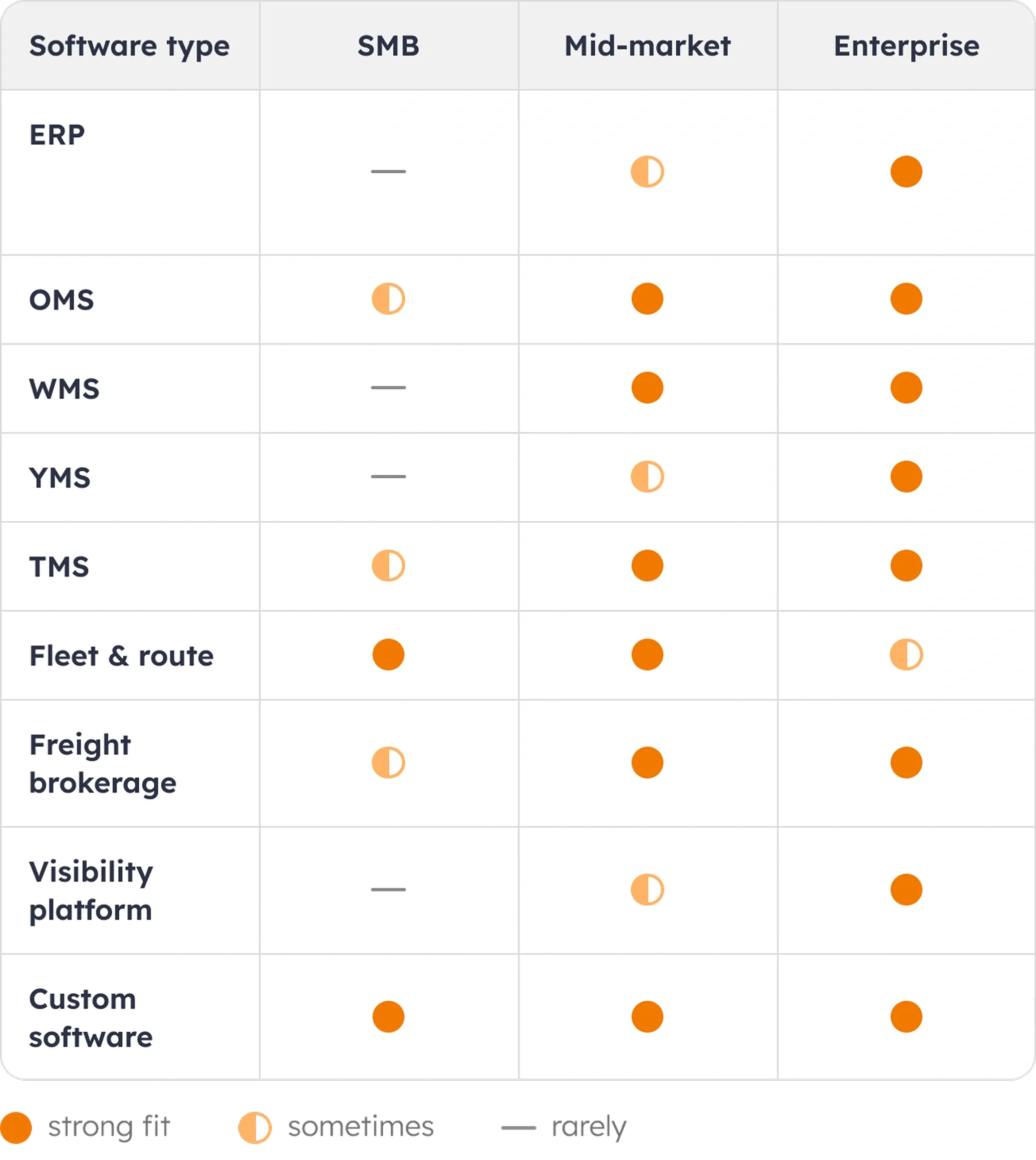
The priorities also change as a company grows. Small businesses usually need software that is easy to set up and manage without a dedicated IT team. Mid-sized companies focus more on integrations – the platform should connect smoothly with ERP systems and provide clear reporting across multiple locations. Large enterprises care most about reliability, scalability, and support. They need guaranteed uptime, broad carrier coverage, and fast assistance when issues arise.
That’s why the best choice isn’t always the most advanced platform. It’s the one designed for businesses of your size and operational needs. A solution built for your segment will deliver more value than a larger, more complex system that was created for a completely different type of company. For example, the best logistics software for small business is often very different from what a large enterprise would choose.
How to choose the right logistics platform: 7-step evaluation
A structured evaluation prevents the two common failures: buying on a polished demo, and buying on price alone. Work through these seven steps in order before signing anything.
Define requirements: shipment volume, team size, carriers, warehouse count, and the top three pain points
Map integrations: ERP, e-commerce, carrier APIs
Shortlist 3–5 vendors that fit your segment
Demo and pilot: live data, real edge cases (split order, failed delivery, silent carrier)
Evaluate Total Cost of Ownership: subscription + implementation, training, integration, support across three years
Check support and Service Level Agreement: uptime, response time, and who owns your data if you leave
Plan implementation: internal owners, go-live criteria, and data migration agreed before the contract starts
Picking the right logistics management software is a sequence of decisions, and the order matters – requirements before vendors, pilots before contracts. Strong logistics IT solutions reveal their weaknesses in step four, which is exactly why the pilot is non-negotiable. If platform selection itself is the bottleneck, IT consulting for logistics platform selection can compress the shortlist work.
Implementation and integration: what to expect
Buying the software is the easy part; getting it live without disrupting operations is where projects succeed or stall. SaaS rollouts typically run 1–6 months end to end, while custom builds run 6–18 months depending on integration depth.
Modsen team runs every implementation through six phases:
1. Discovery: requirements gathering, process mapping, integration design.
2. Integration design: API mapping to ERP, e-commerce, and carrier systems.
3. Data migration: historical shipment data, carrier contracts, inventory records.
4. Testing: end-to-end scenario testing and user acceptance testing.
5. Go-live: phased rollout or full cutover, depending on risk tolerance.
6. Support: a hypercare period of the first 30–60 days, then standard SLA coverage.
The integrations that matter cluster in four areas: ERP systems (SAP, Oracle, NetSuite, Microsoft Dynamics), e-commerce platforms (Shopify, WooCommerce, Magento), carrier APIs (FedEx, UPS, DHL, USPS), and visibility platforms (project44, FourKites). Capable platforms treat integration as a design phase, not an afterthought bolted on at go-live. When internal engineering capacity is the constraint, IT team augmentation for logistics projects keeps the timeline intact without permanent headcount.
FAQ
What is logistics management software?
What is the difference between TMS and WMS?
What logistics software is best for shipping and freight?
How much does logistics software cost?
Which logistics software companies are leading in 2026?
When does a business need custom logistics software?
Conclusion
The lesson is simple: logistics management software is a stack of choices, and the winning pick fits your size, your integrations, and the failure point you are trying to fix. Never the loudest vendor.
Start with a process audit: map your top three cost leaks, then test real candidates against real data. When you are ready to choose or build, talk to the Modsen logistics engineering team. The right software pays for itself in months – the only expensive choice is the wrong one.
References
1.
2.
3.
4.
Read more





Get a weekly dose of first-hand tech insights delivered directly to your inbox