
LOGISTICS SOFTWARE FOR SMALL BUSINESS: HOW TO CHOOSE THE RIGHT SOLUTION
10 min read
Last updated: Jul 27, 2026
Summary
If your team still tracks shipments in a spreadsheet, you are not alone – and that is usually where the trouble starts. Logistics software for small business helps companies with limited resources automate shipments, track deliveries, compare carrier rates, and reduce the manual work that makes shipping operations slower, more expensive, and more prone to errors. Ready-made tools can get you started, but as your operation grows, a solution built around your own processes is usually the more reliable and forward-looking choice. This guide explains what to look for when evaluating logistics software solutions, how the main options compare, and what factors to consider before investing in custom logistics software development services.
Key takeaways
Logistics software for small businesses helps automate shipping, tracking, invoicing, and other repetitive logistics tasks.
For most small businesses, cloud-based solutions are the easiest and most cost-effective way to get started.
The most valuable features are shipment tracking, carrier rate comparison, shipping automation, inventory synchronization, and basic reporting.
Businesses operating their own vehicles should also consider fleet maintenance software to reduce downtime and keep operating costs under control.
Off-the-shelf software works well for standard processes, while custom software for logistics becomes worth considering when growth, complexity, or unique workflows start creating limitations.

Paul Kirikov
Head of Business Development Department
What does logistics software for small business actually do?
At its core, logistics software for small business automates the logistics tasks that begin once a customer places an order. Someone has to book the carrier, print the label, create the tracking number, send the invoice, and answer the “where is my order?” email. Done by hand, that can take three hours a day. Good software for logistics does the same work in minutes.
Most logistics software solutions cover a predictable set of core functions: shipment booking, real-time tracking, carrier rate comparison, automated invoicing, and basic reporting. The value is not in any single feature – it is in clearing away the repetitive admin work that quietly fills your week. The simplest way to judge a tool is to ask one question: does it actually save you hours, or does it simply move the same tasks from one place to another?
The data shows how common the manual trap still is. According to Capterra's 2026 buyer research, around 24% of small and midsize businesses still rely on spreadsheets for inventory operations. And when these businesses do move to dedicated software, the two reasons they give most often are inefficiency (50%) and limited functionality (33%) – in plain terms, they were losing too much time to manual fixes, and their old setup simply could not keep up as they grew.
Cloud-based vs on-premise logistics software
Cloud-based software runs on remote servers maintained by a provider and is accessed over the internet via a web browser or mobile app. This includes both ready-made subscription services (SaaS) and custom software hosted in the cloud. “On-premise” means the software is installed and runs directly on your company’s local hardware and servers.
Here is how the two deployment models compare for a small logistics operation:
Cloud-based
Upfront cost
Low to moderate – Subscription fees or cloud hosting costs.
IT infrastructure
Outsourced – The cloud provider manages server health, hardware, and physical security.
System updates
Streamlined – Deployed quickly to the cloud, often automated by the developer.
Data control
Shared responsibility – Data is stored securely in remote data centers.
On-premise
Upfront cost
High – Heavy investments in server hardware and perpetual software licenses.
IT infrastructure
In-house – Your team fully owns and manages server maintenance, power, and backups.
System updates
Manual – Installed and scheduled by your IT team based on your business needs.
Data control
Fully in-house – Complete ownership and physical control over where data resides.
For most small businesses, cloud-based software is usually the most practical choice. It requires less upfront investment, is easier to deploy, and reduces the need to manage your own infrastructure. On-premise logistics software is generally worth considering when your business needs complete control over its infrastructure and data, has strict security or compliance requirements, or already maintains an internal IT environment capable of supporting it.
Must-have features for small business logistics software
When you compare shipping and logistics software, the marketing pages all start to look the same, and the market is crowded with options that promise to do everything. Rather than focusing on long feature lists, pay attention to the following capabilities that deliver the greatest value for a small business.
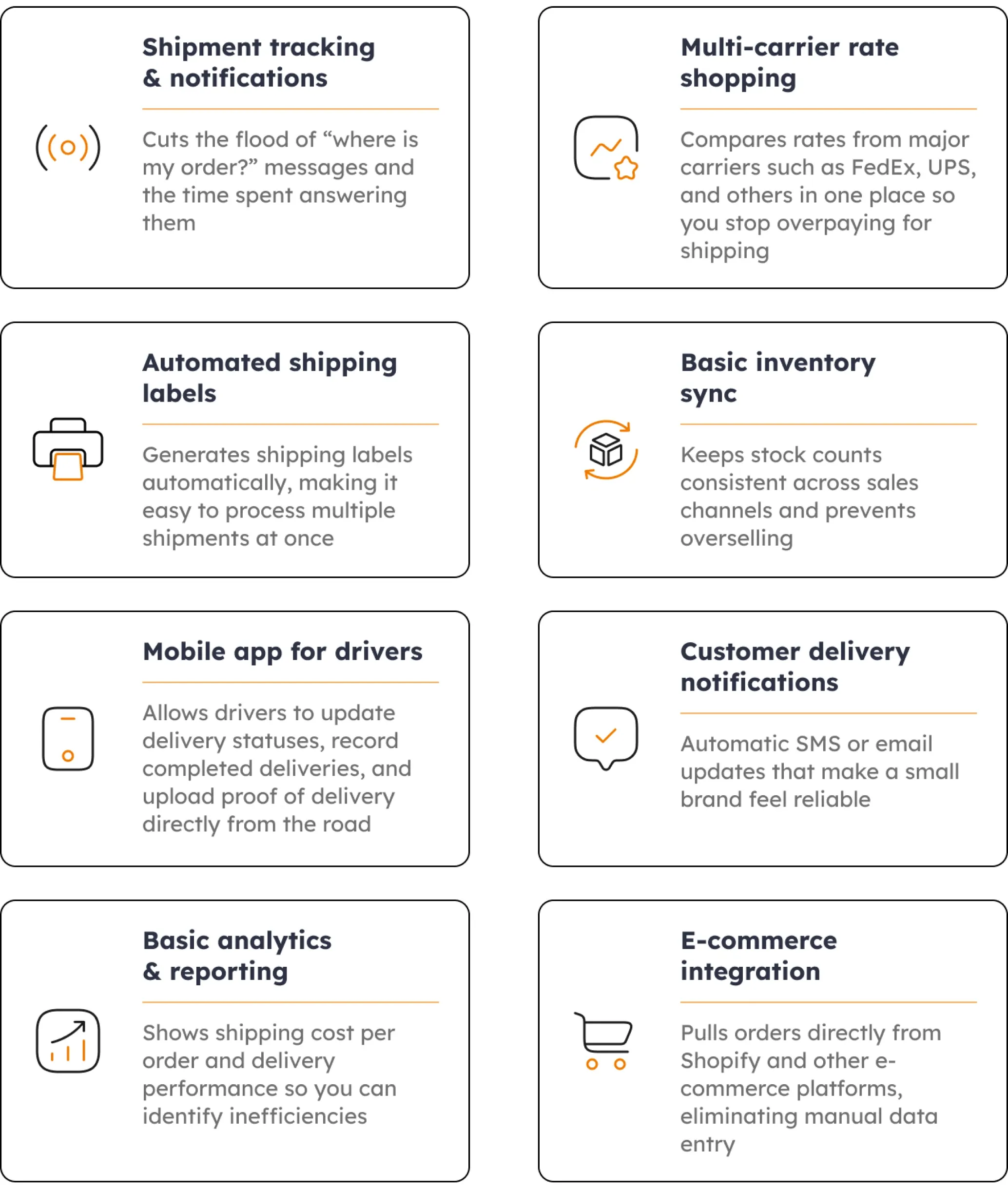
The rule is simple: if a feature does not save time, reduce errors, or cut costs, it is a nice-to-have rather than a must-have. And when none of the ready-made tools fit the way you actually work, that gap is exactly what custom software development services are built to close, giving you only the features you need.
Fleet maintenance software for small business fleets
If your business manages its own fleet, logistic software alone may not be enough. Once you are managing five to fifty vehicles, keeping them on the road becomes a job in itself. Small fleet maintenance software handles the things that are easy to forget until something breaks: service reminders, mileage tracking, fuel logs, driver records, and the compliance documents an inspector will ask for.
The business case is about uptime, not paperwork. For a small fleet, a single vehicle off the road can disrupt deliveries and increase operating costs. Maintenance software helps catch issues earlier, improve vehicle utilization, and make ownership costs more predictable.
For businesses that are actively expanding their operations, these challenges tend to grow alongside the fleet. More vehicles mean more routes, more maintenance requirements, and more coordination across teams. If your company is scaling and relies heavily on transportation, our guide to transportation logistics software for growing fleets explores the tools, features, and considerations that become important as fleet operations become more complex.
Fleet tracking vs fleet maintenance
These two get confused constantly, so it helps to separate them. Fleet tracking is about location – GPS and real-time positioning that tells you where a vehicle is right now. Fleet maintenance is about “health” – service reminders, repair history, and cost per vehicle. Many platforms bundle both, but you do not always need the full set on day one.
A quick way to decide: if your main worry is “where is my driver, and will the delivery arrive on time?”, tracking alone may be enough. If it is “why do my repair bills keep climbing, and which truck is the problem?”, that is where small fleet maintenance software pays off. Most growing operations end up wanting both, just rarely at the very start.
Why you should choose custom logistics software solutions
Custom logistics software is software built around your business, rather than a product you rent and adapt to. Off-the-shelf tools are a sensible starting point, and for a simple operation they may be all you ever need. But as your processes mature, the case for a tailored build gets stronger – and the numbers show why companies are investing. According to Precedence Research, the global logistics software market is set to grow from about $16.3 billion in 2025 to $34.7 billion by 2035, with cloud tools already making up roughly 64% of it and small and mid-sized firms named as a key driver. In other words, logistics software should be chosen with long-term growth in mind, not just immediate needs.
Here is how the two deployment models compare for a small logistics operation:
Off-the-shelf SaaS
Fit to your workflow
You adapt to the tool
Cost over time
Per-user or per-shipment fees that climb as you grow
Integrations
Limited to supported apps
Ownership
You rent access
Custom solution
Fit to your workflow
The tool fits how you already work
Cost over time
Higher upfront, but no runaway subscription costs
Integrations
Connects to any system you run
Ownership
You own the software and the data
None of this means custom is always the answer – it is an investment, and a good partner will tell you when a ready-made tool is better investment. However, when standard tools no longer fit the way your business operates, a custom platform can eliminate workarounds and support your processes more effectively. You can see what that looks like in practice in our delivery management app case study, where a purpose-built tool replaced a tangle of manual steps. It is also why many growing logistics software companies eventually move from renting tools to owning the system that runs their business.
When basic logistics software is no longer enough
Plenty of small businesses run on a basic tool for years, and some never need anything more. But there are clear signals that off-the-shelf logistics IT solutions are starting to hold you back rather than help:
You are shipping more than ~200 orders a month and the tool starts to create operational bottlenecks.
Your fleet has grown past roughly 20 vehicles.
You operate across multiple warehouses or locations that need a single view.
You have custom pricing or routing rules that no standard tool supports.
When two or more of these are true, the usual next step is to move from a single-purpose tool toward a fuller platform – and that is the moment the buy-versus-build question gets real. There is no universal answer; it depends on the project. But it is worth being honest about the trade-off: custom software is an investment, not a quick fix. It pays back when your processes are genuinely non-standard and a generic tool would make you work around it every single day.
The smart move is not to jump straight into a big build. It is to start with a short audit and a conversation with engineers who have shipped logistics products before. And when you already know the direction and just need senior hands to deliver it, IT team augmentation for logistics projects lets you add proven engineers without a long hiring cycle.
FAQ
What is the best logistics software for small business in 2026?
How much does logistics software cost for small businesses?
What features should small fleet maintenance software have?
What logistics IT solutions are affordable for small businesses?
Can I integrate logistics software with Shopify?
Conclusion
For most small businesses, the best logistics software solutions are straightforward: cloud-based, easy to implement, equipped with multi-carrier shipping support, and, for businesses operating vehicles, reliable fleet maintenance features. A ready-made tool is a smart way to begin and prove time savings. But as your operation grows, custom logistic software solutions become the more dependable choice – software that fits your exact process, scales without runaway fees, and works as a long-term asset rather than a temporary solution that needs replacing a year later.
If you are evaluating those options, talk to our team about logistics software for small business that fits your size, goals, and budget – from choosing the right starting solution to planning a custom platform. For businesses that are still exploring the market and weighing different types of logistics platforms, our logistics management software buyer's guide 2026 offers a useful starting point.
References
Read more





Get a weekly dose of first-hand tech insights delivered directly to your inbox